

Docker AI stack
Introduction
This post is a shorter and updated version of my previous Docker Compose based AI stack.

It will focus on what I mainly use : a Llama.cpp server, with OpenAI compatible API, running LLMs fine tuned for Fill In the Middle (FIM) completion, and Tabby to integrate completions in my editor.
I use Linux and have an Nvidia GPU (RTX 3090). If you have a mac or another type of GPU need to head to https://github.com/ggml-org/llama.cpp/blob/master/docs/docker.md and use the correct `server` image variant (rocm, vulkan etc.).
I have installed Docker and Docker Compose, and am using an Nvidia GPU, so I needed the Nvidia Container Toolkit too.
Create a directory to host all this stuff, I will use `~/ai-stack` in this article

mkdir ~/ai-stack
cd ~/ai-stack

# for the models
mkdir models

# and init a git repo
git init
# ignore secrets and data dirs
echo -e ".env.*\nmodels" > .gitignore

touch docker-compose.yml
Llama.cpp : the backend
First, download a model, I suggest Unsloth's excellent GGUFs huggingface.co/unsloth/Qwen3-Coder-30B-A3B-Instruct-GGUF. I'm using the `Q4_K_XL` variant. Download it in the `models` folder.
Then, let's create our first service : the llama server
services:
  llama:
    image: ghcr.io/ggml-org/llama.cpp:server-cuda
    runtime: nvidia
    command:
      - --jinja
      - --no-context-shift
      - --flash-attn
      - on
      - --n-gpu-layers
      - "999"
      - --model
      - /models/Qwen3-Coder-30B-A3B-Instruct-UD-Q4_K_XL.gguf
      - --rope-scaling
      - yarn
      - --rope-scale
      - "4"
      - --cache-type-k
      - q4_0
      - --cache-type-v
      - q4_0
      - --ctx-size
      - "131072"
    restart: always
    container_name: llama
    ports:
      - 127.0.0.1:8081:8080
    volumes:
      - ./models:/models
We use a base context of 128k tokens, then we use RoPE to multiply it by 4 and to save some VRAM we use q4_0 quantization for storing this context. It allows me to use a theorical 512k context.
If you run into out of memory errors, you should reduce `ctx-size`, `rope-scale`, or disable rope.
We will later need a few hundred megabytes of free VRAM to load an embedding model for Tabby, so mind to not saturate your VRAM here.
You can test your llama server by running the service :
docker compose up llamaGive it a few dozen seconds to load the model, you'll see `main: server is listening on http://0.0.0.0:8080 - starting the main loop` when it's ready.
Go on http://localhost:8080 and check that the web UI is launched and that you can talk to Qwen 3.
Embedding
You will need to start a 2nd instance of llama-server to embed code, it will allow Tabby to import some of your codebases (or any Github/Gitlab/website) to improve code completion, I downloaded an embedding model : https://huggingface.co/nomic-ai/nomic-embed-text-v1.5-GGUF (I picked the .f16 one, which as the best quality and has a size of 274MB. Put it next to the other model, then add a second llama-server service :
services:
  llama: #unchanged

  embedding:
    image: ghcr.io/ggml-org/llama.cpp:server-cuda
    container_name: embedding
    restart: always
    runtime: nvidia
    command:
      - --n-gpu-layers
      - "999"
      - --model
      - /models/nomic-embed-text-v1.5.f16.gguf
      - --ctx-size
      - "2048"
      - --embeddings
      - --no-webui
    ports:
      - 8082:8080
    volumes:
      - ./models:/models
docker compose up embeddingThis time the model is loaded in a few seconds.
Code completion : Tabby
On their Github, their is a one liner to launch Tabby with Docker.
Before using it, we need to tell Tabby to use our llama.cpp backend :
mkdir ~/.tabby
touch ~/.tabby/config.toml

# use your favorite text editor to put this into config.toml
[logs]
level = "debug"

[model.completion.http]
kind = "llama.cpp/completion"
# this does not matter, it's managed by llama.cpp
model_name = "qwen"
api_endpoint = "http://llama:8080"
prompt_template = "<|fim_prefix|>{prefix}<|fim_suffix|>{suffix}<|fim_middle|>"

[model.chat.http]
kind = "openai/chat"
model_name = "qwen"
api_endpoint = "http://llama:8080"


[model.embedding.http]
kind = "openai/embedding"
model_name = "Nomic-Embed-Text"
api_endpoint = "http://embedding:8080"
Now launch Tabby once and get the generated auth token :
docker run -it \
  -p 8082:8080 -v $HOME/.tabby:/data \
  tabbyml/tabby \
  serve
Now head to http://localhost:8082 to create an account and check that Tabby is running.
Click on your profile picture and copy your auth token, omitting the `auth_` prefix.
Add the Tabby service in your compose file (mind to replace $YOUR_AUTH_TOKEN) :
services:
  llama: #unchanged
  embedding: #unchanged

  tabby:
    restart: always
    image: registry.tabbyml.com/tabbyml/tabby
    command: serve
    container_name: tabby
    volumes:
      - "$HOME/.tabby:/data"
      - "$HOME/dev:/data/dev"
    ports:
      - 8085:8080
    environment:
      - RUST_BACKTRACE=full
      - TABBY_WEBSERVER_JWT_TOKEN_SECRET=$YOUR_AUTH_TOKEN
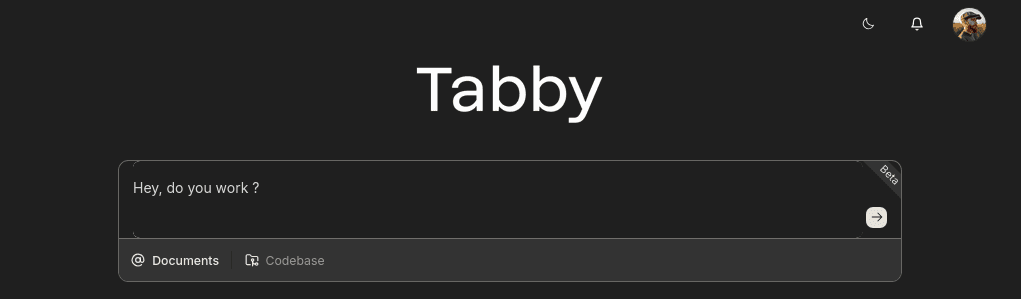
You can test the connection to llama in the first box :
Text editor plugin
Tabby has plugins for Vim/Neovim, Eclipse, VSCode and IntelliJ, click on the link that suits your editor to get started.
Note that you want to point your config to http://localhost:8082 where tabby is listening.
For my Neovim using Lazy as a plugin manager, it is as simple as this :
  {
    "TabbyML/vim-tabby",
    lazy = false,
    dependencies = {
      "neovim/nvim-lspconfig",
    },
    init = function()
      vim.g.tabby_agent_start_command = { "npx", "tabby-agent", "--stdio" }
      vim.g.tabby_inline_completion_trigger = "auto"
      vim.g.tabby_inline_completion_keybinding_accept = "<C-CR>"
    end,
  }
You can check your tabby agent config in ~/.tabby-client/agent/config.toml.
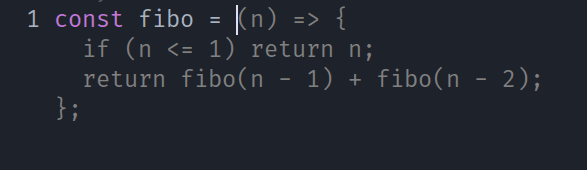
And that's it, I now have some code completion updating on text input, that I accept with Control+Enter
Full Docker Compose file
services:
  llama:
    image: ghcr.io/ggml-org/llama.cpp:server-cuda
    runtime: nvidia
    command:
      - --jinja
      - --no-context-shift
      - --flash-attn
      - on
      - --n-gpu-layers
      - "999"
      - --model
      - /models/Qwen3-Coder-30B-A3B-Instruct-UD-Q4_K_XL.gguf
      - --rope-scaling
      - yarn
      - --rope-scale
      - "4"
      - --cache-type-k
      - q4_0
      - --cache-type-v
      - q4_0
      - --ctx-size
      - "131072"
    restart: always
    container_name: llama
    ports:
      - 127.0.0.1:8081:8080
    volumes:
      - ./models:/models

  embedding:
    image: ghcr.io/ggml-org/llama.cpp:server-cuda
    container_name: embedding
    restart: always
    runtime: nvidia
    command:
      - --n-gpu-layers
      - "999"
      - --model
      - /models/nomic-embed-text-v1.5.f16.gguf
      - --ctx-size
      - "2048"
      - --embeddings
      - --no-webui
    ports:
      - 8082:8080
    volumes:
      - ./models:/models

  tabby:
    restart: always
    image: registry.tabbyml.com/tabbyml/tabby
    command: serve
    container_name: tabby
    volumes:
      - "$HOME/.tabby:/data"
      - "$HOME/dev:/data/dev"
    ports:
      - 8085:8080
    environment:
      - RUST_BACKTRACE=full
      - TABBY_WEBSERVER_JWT_TOKEN_SECRET=$YOUR_AUTH_TOKEN
You can now test the stack :
docker compose up -d llama embedding tabby && docker compose logs -favante.nvim
If you use Neovim you may check avante.nvim to integrate your LLM as an agent.
I also use mcphub.nvim to manage MCP servers, and both plugins play well with each other.
This is my config snippet for reference (it uses lazy.nvim).
  {
    "yetone/avante.nvim",
    event = "VeryLazy",
    lazy = false,
    version = false,
    config = function()
      require("avante").setup {
        -- add any opts here
        provider = "llama",
        auto_suggestions_provider = "llama",
        providers = {
          llama = {
            __inherited_from = "openai",
            api_key_name = "OPENAI_API_KEY",
            endpoint = "http://localhost:8081/v1",
            model = "Qwen/Qwen3-14B-AWQ",
            disable_tools = false,
            stream = true,
          },
        },
        mappings = {
          suggestion = {
            accept = "<C-CR>",
            next = "<Tab>",
            prev = "<S-Tab>",
            dismiss = "<Esc>",
          },
        },
        behaviour = {
          auto_suggestions = false, -- Experimental stage
          auto_set_highlight_group = true,
          auto_set_keymaps = true,
          auto_apply_diff_after_generation = false,
          support_paste_from_clipboard = false,
          minimize_diff = true, -- Whether to remove unchanged lines when applying a code block
        },
        disabled_tools = {
          "list_files",
          "search_files",
          "read_file",
          "create_file",
          "rename_file",
          "delete_file",
          "create_dir",
          "rename_dir",
          "delete_dir",
          "bash",
        },
        system_prompt = function()
          local hub = require("mcphub").get_hub_instance()
          if hub then
            return hub:get_active_servers_prompt()
          end
        end,
        -- The custom_tools type supports both a list and a function that returns a list.
        -- Using a function here prevents requiring mcphub before it's loaded
        custom_tools = function()
          return {
            require("mcphub.extensions.avante").mcp_tool(),
          }
        end,
      }
    end,
    -- if you want to build from source then do `make BUILD_FROM_SOURCE=true`
    build = "make",
    dependencies = {
      "stevearc/dressing.nvim",
      "nvim-lua/plenary.nvim",
      "MunifTanjim/nui.nvim",
      --- The below dependencies are optional,
      "hrsh7th/nvim-cmp", -- autocompletion for avante commands and mentions
      "nvim-tree/nvim-web-devicons", -- or echasnovski/mini.icons
      "zbirenbaum/copilot.lua", -- for providers='copilot'
      {
        -- support for image pasting
        "HakonHarnes/img-clip.nvim",
        event = "VeryLazy",
        opts = {
          -- recommended settings
          default = {
            embed_image_as_base64 = false,
            prompt_for_file_name = false,
            drag_and_drop = {
              insert_mode = true,
            },
            -- required for Windows users
            use_absolute_path = true,
          },
        },
      },
      {
        -- Make sure to set this up properly if you have lazy=true
        "MeanderingProgrammer/render-markdown.nvim",
        opts = {
          file_types = { "markdown", "Avante" },
        },
        ft = { "markdown", "Avante" },
      },
    },
  },
  {
    "ravitemer/mcphub.nvim",
    dependencies = {
      "nvim-lua/plenary.nvim", -- Required for Job and HTTP requests
    },
    cmd = "MCPHub", -- lazy load
    build = "npm install -g mcp-hub@latest", -- Installs required mcp-hub npm module
    config = function()
      require("mcphub").setup {
        extensions = {
          avante = {
            make_slash_commands = true,
          },
        },
      }
    end,
  },
Additional tools
- Qwen Code, a fork of Gemini CLI that you can plug on your llama server.
- OpenCode an opensource CLI agent, similar to Qwen's
Sources
Maybe the best source when you are interested in local AI
Maybe the second best source
The amount of work there is over 9000
Great project, written in Rust so even greater
Share this article


